


scls-util howto
scls-util is a command-line tool for inspecting, validating, and manipulating SCLS (Standard Canonical Ledger State) files.
This tool is intended to be the primary utility for inspecting and validating SCLS files. It provides built-in usage documentation via the --help command for all commands and subcommands.
In this HowTo document, we focus on practical usage scenarios and explain how the tool can be used in real workflows, rather than documenting every command option in detail.
The document is structured around typical user groups and describes common scenarios in which each group interacts with SCLS files.
End Users: Inspecting and Researching Ledger Data
Who are they?
End users are people who consume SCLS files, but do not produce them:
- auditors and reviewers
- researchers
- tool authors building read-only analysis
- operators verifying downloaded snapshots
They want to trust, inspect, and extract information from SCLS files without understanding their internal construction.
✔️ “Is this file valid and untampered?”
If you want to be able to check the hash of the file you want to verify, you can use checksum command:
% scls-util checksum 1.scls
Verifying root hash for: 1.scls
Root hash verification PASSED
Hash: 8240d2f3859ecda95c94c295a9ed8bc2cbe816cbe5306dccf084e888
The tools outputs log data to stderr, and main output to stdout, so if you need only hash then you can use redirections:
% scls-util checksum 1.scls 2>/dev/null
Hash: 8240d2f3859ecda95c94c295a9ed8bc2cbe816cbe5306dccf084e888
If you don’t need to verify internal content and output the precalculated hash you can use --no-verify option:
% scls-util checksum 1.scls 2>/dev/null --no-verify
Hash: 8240d2f3859ecda95c94c295a9ed8bc2cbe816cbe5306dccf084e888
The same option may be used to find the hash of a particular namespace:
% scls-util checksum 1.scls --namespace utxo/v0
Verifying hash for namespace: utxo/v0
Namespace hash verification PASSED
Hash: 8f2cdc8438b74d1337fa5ff930c1add00124c1caff3dc77ac666b032
🔍 “What data does this file contain?”
If you need to find the information about the container you can use file command
that provides interfaces for a general analysis and tools for modifying the file:
% scls-util file 1.scls list-ns
Namespaces:
  - blocks/v0
  - utxo/v0
and more general information about the container contents:
scls-util -- file 1.scls info
File: 1.scls

=== File Information ===
Root Hash: Digest 8240d2f3859ecda95c94c295a9ed8bc2cbe816cbe5306dccf084e888
Total Entries: 2048
Total Chunks: 2

=== Namespaces ===

blocks/v0:
  Hash: Digest f64a20032553be12f2ead2d34a34440d023fa703b28321b43df60077
  Entries: 1024
  Chunks: 1

utxo/v0:
  Hash: Digest 8f2cdc8438b74d1337fa5ff930c1add00124c1caff3dc77ac666b032
  Entries: 1024
  Chunks: 1
🧩 “I only care about part of the data”
If you are interested only in the part of the state - for example, you want to view a particular namespace,
then you can use split to split a file into separate files (one per namespace):
% scls-util file 1.scls split output
Splitting file: 1.scls
Output directory: output
  Creating output/blocks_v0.scls for namespace blocks/v0
  Creating output/utxo_v0.scls for namespace utxo_v0
Split complete. Generated these files:
  - output/blocks_v0.scls
  - output/utxo_v0.scls
You can do an opposite operation and merge multiple files into one by utilising
% scls-util file 1.scls merge output/blocks_v0.scls output/utxo_v0.scls
Merging 2 file(s) into: 1.scls
Found 2 unique namespace(s)
Merge complete
If you do not want all namespaces but only certain ones, then you can use the extract command
to extract only relevant namespaces.
↔️ “How do these two files differ?”
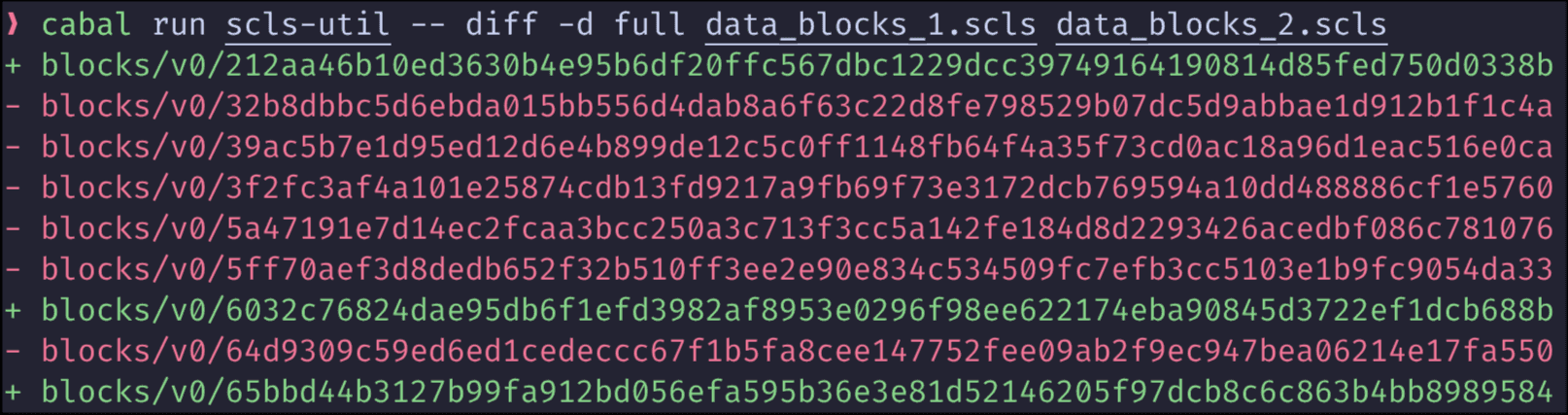
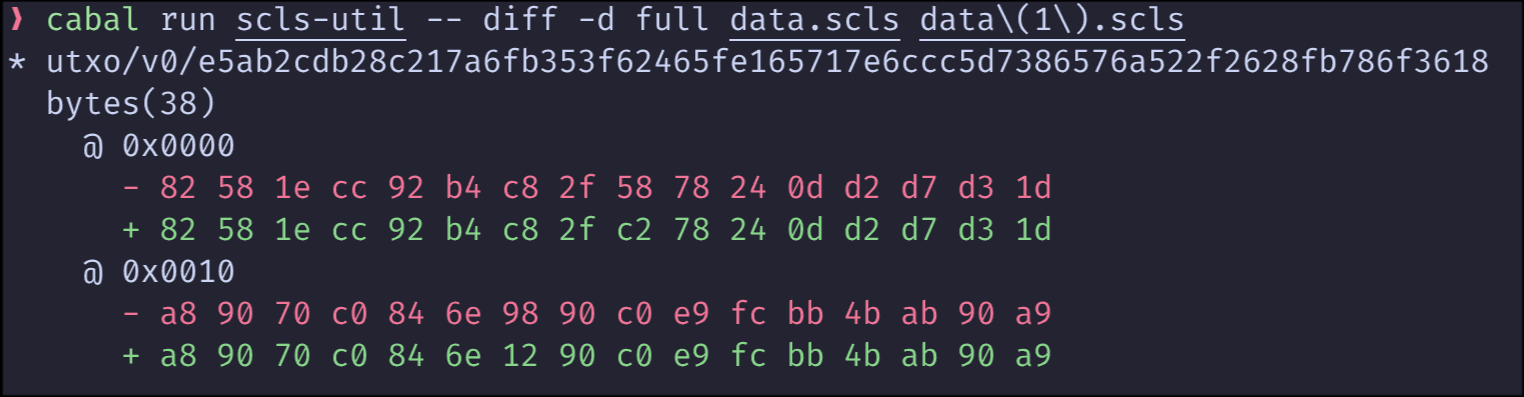
If you want to compare two SCLS files, you can use the diff command:
% scls-util diff 1.scls 2.sclsThis command will show the differences between the two files. You can control the verbosity and depth of the output with the --verbosity and --depth flags.
It is useful that the diff output is in a human-readable format, which makes it easier to identify and understand the differences between the files. Examples of such diffs can be found below:

🧩 “How to read CBOR data”
Cardano uses CBOR data to keep a lot of information if you want to have a raw CBOR data, it’s possible to stream namespace as a stream of key-value pairs.
% scls-util file 1.scls unpack 2.scls utxo/v0
Converting file: 1.scls
Output file: 2.scls
You can later process this file with cbor tools:
cbor-tool dump --pretty 2.scls | head -n 30

82  # list(2)
   58 22 00 30 62 f5 df f8 27 5c aa 56 9c 6b df 6d
   5c 45 7b 75 f5 7c 08 dc 82 58 2f 0a f3 c9 5f 93
   ac 84 26 00  # bytes(34)
   82  # list(2)
      01  # int(1)
      a2  # map(2)
          # key
         00  # int(0)
          # value
         58 1e a8 b6 5c 09 f5 aa 88 e5 78 60 d7 97 a9 5d
         df 5d 03 95 ab 20 a9 0c a1 ae 4e bd 49 50 11 82  # bytes(30)
          # key
         01  # int(1)
          # value
         82  # list(2)
            1a 9b 96 ac 71  # int(2610343025)
            a5  # map(5)
                # key
               58 1c 05 32 7a d9 03 16 73 74 c1 99 fa c0 38 e9
               bf d3 da 7f 4c f4 2b 61 18 94 dd 76 2d e9  # bytes(28)
                # value
               a1  # map(1)
                   # key
                  49 a3 bd 0b 77 17 70 95 ca 5a  # bytes(9)
                   # value
                  1b 89 5a 81 51 1a 0c 59 e6  # integer(9897365316429437414)
                # key
               58 1c 4c 6b f4 31 e1 32 da 0b f5 c0 ca ea 9d f2
🧠 “I want to understand the format”
For researchers and advanced users, understanding what a namespace represents matters.
% scls-util info namespacesreturns information about all namespaces supported by the tool.
% scls-util info cddl utxo/v0Will output information about the CDDL used to validate the specified namespace
Node Developers: Creating and Debugging SCLS Files
Who are they?
Node developers and tool authors who:
- produce SCLS files
- integrate canonical state into nodes
- debug serialization, hashing, or namespace logic
- test new namespace definitions
They care about correctness, repeatability, and debug visibility.
Core scenarios for Node Developers
🛠️ “Does my generated file match the spec?”
How to validate that the file is consistent
% scls-util verify 1.sclsVerifies file, in addition to checking hashes it ensures:
- canonical ordering of the values in the file
- all the values conform to CDDL specification
- all the values are stored in canonical form
All the errors will be reported.
🧪 “I need test data”
During development, real ledger data is often unnecessary or unavailable.
scls-util debug generateCreate synthetic SCLS files.
🧵 “I need to inspect internal entries”
When debugging serialization or hashing issues, developers often need: exact byte-level visibility specific entries by index
scls-util debug print-hex🧠 “I want to understand the format”
For researchers and advanced users, understanding what a namespace represents matters.
% scls-util info namespacesreturns information about all namespaces supported by the tool.
% scls-util info cddl utxo/v0Will output information about the CDDL used to validate namespace
